

A clear explanation of 3D recordings in AR
3D recordings in AR capture a person's movement, voice, and presence as a spatial experience. This can be anchored in the real world or shared remotely. Instead of the flat 2D footage that we're used to in TV and movies, 3D recordings result in a volumetric experience that appears at true scale and can be viewed at any angle.
A 3D recording combines depth sensing and capture with real-time rendering and spatial mapping. Traditional 3D recordings capture volumetric 3D models of performers in complex capture studios with depth cameras all around the subject. These can result in high-fidelity realistic captures, but they are also extremely large files that can be difficult to render in AR or VR devices. Additionally, these captures happen in an empty studio, so the performer can’t react to a physical space and doesn’t have the benefits of a location-based AR scene.
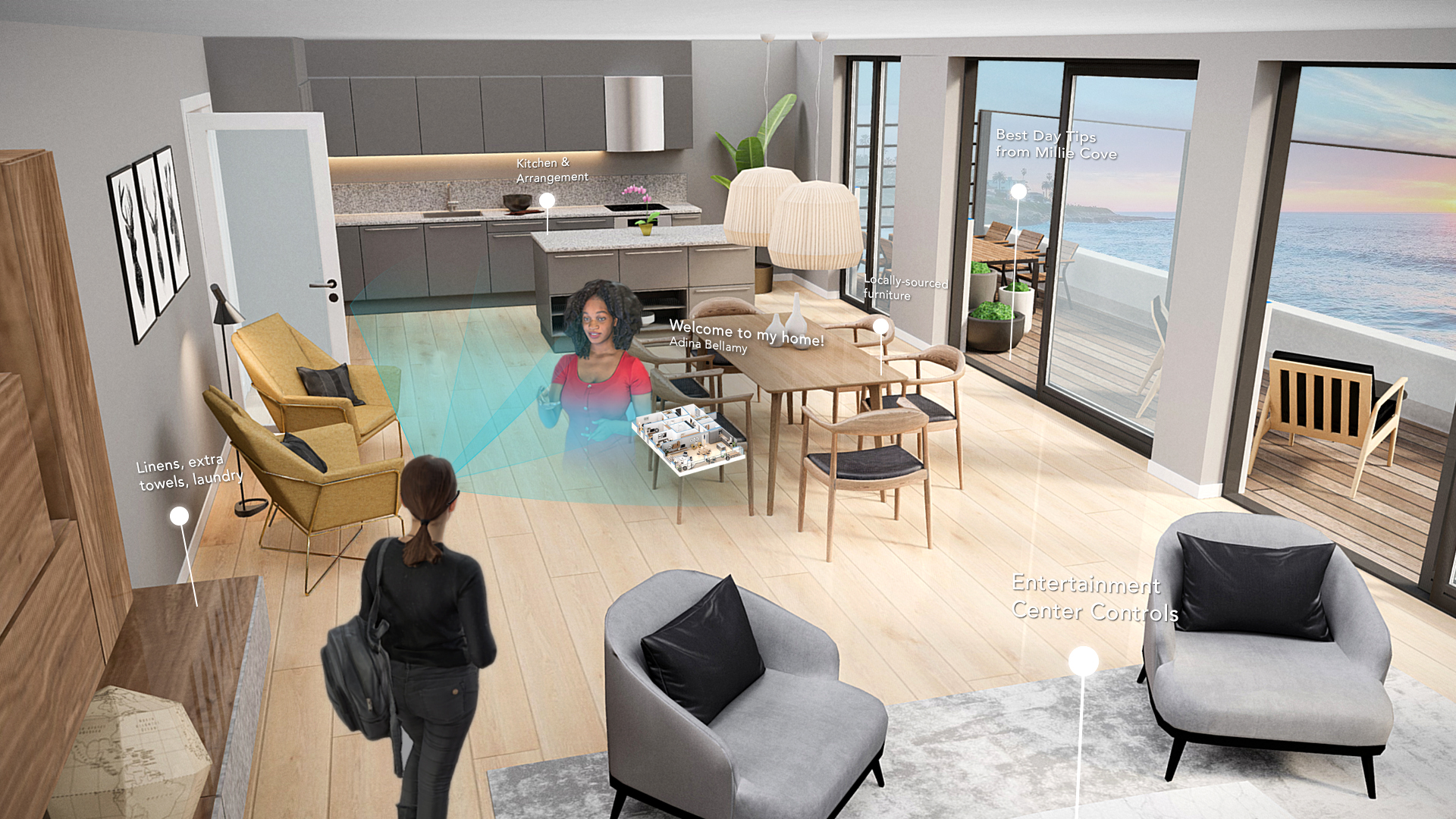
With Trace, we have introduced contextual 3D recordings that capture not just a person, but also their position inside a specific place. These 3D recordings can be captured with a single tap with any commercial iPhone. The user walks, moves, and speaks naturally. The system will record them volumetrically and save that moment precisely where it happened in space. Someone may wonder why spatial placement matters for 3D recordings, and the answer is that when a recording is anchored precisely to a location, it feels just like a spatial memory that you can replay in the exact space.
When contextual 3D recordings are deployed, devices like the Apple Vision Pro or mobile phones with ARKit or ARCore use world tracking and spatial audio to anchor the 3D recording in the same physical location. The precise anchoring allows experts, historians or any guide to place their holographic message in a location that is the most helpful for visitors.
3D recordings create presence and are an ideal way of sharing information. A hologram of a person can appear in your room at the correct scale and move naturally inside your space. This makes explanations, training, and storytelling feel more personal. An architect can give you notes about a project site as you're walking through it, pointing out details. A friend can leave a message in a place that matters to both of you, or a technician can point out details directly on a piece of machinery as you learn it.
Asynchronous 3D recordings open up a brand new category of communication. A person could leave guidance within a workplace, instructions within a home, or historical lessons in a museum or at a landmark. When any viewer visits that space, that recording can appear exactly where it was made.
This new type of media is profound because it can rewind and replay the past, and it acts like a form of spatial memory. Over time, environments can hold layers of knowledge, stories, and personal moments from the people who impacted those locations the most. That ability to re-experience the past makes it both more tangible and emotionally engaging for the audience.
Trace is focused on how 3D recordings can become a rich addition to immersive AR scenes. By allowing users to record themselves in a single click, it makes the technology accessible to everyone, not just those who have access to expensive immersive recording studios. You can learn more about how to create these spatial recordings and ensure that they are anchored, context-aware, and shareable across phones, tablets, and AR headsets.
When creating 3D recordings, they should feel natural and contextual.
Placement matters.
Making 3D recordings correctly will allow them to appear in the exact spot they were captured. Viewers should be able to walk around them comfortably and observe the interactions between the digital hologram and their physical surroundings.
Choose the right Avatar.
With Trace AR, you can make stylized avatars using Ready Player Me, you can use an abstract avatar, or create a photorealistic one by contacting the Trace team. Your representation is important to convey your message clearly and effectively.
Audio should be spatial and clear.
When making a 3D recording, ensure that your space is quiet and free from background noises. Speak in the direction that your audience will view you in AR, just like you were talking to real people in the space.
Choose appropriately timed clips.
When making 3D recordings, be aware that some viewers may see it on their mobile devices. Shorter clips are more effective so viewers can move from recording to recording without holding their phone up for extended periods.
Plan out your recording.
When you make a Spatial recording, it can be viewed countless times by visitors. Ensure your phone is facing you for accurate tracking, speak clearly and move naturally just like you normally would. Point out key details to draw their attention and do multiple takes to get it right.
• An instructor walks around his workshop pointing to equipment and explaining it so that future visitors can learn about the space easily.
• A historian leaves Spatial recordings beside each exhibit in a museum so visitors can learn from his expertise at their own pace.
• A Trace scene where recordings act as chapters inside of an immersive training workflow that onboards new employees
• 3D recordings do not require full volumetric rigs. Trace allows for a lightweight recording with any iPhone.
• A 3D recording isn't always better than video, but it is more useful when it engages viewers with spatial information and contextual details.
3D recordings are a great way to make AR experiences feel more immediate, personalized, and helpful. When recordings are contextual, they can be a powerful tool for spatial communication, training, memory, and storytelling.
Learn about augmented reality or start creating your own experiences.