

A clear explanation of spatial interfaces and principles for AR experiences
Spatial interfaces are a combination of UI and input that are deployed in 3 dimensions and leverage movement, attention, and embodied interaction. They extend interface design beyond screens by laying out elements all around you in virtual or physical spaces.
Interfaces have evolved from command lines to graphical windows and eventually to mobile layouts. With each step, the UI and interaction method leveraged the medium’s hardware, display capabilities and input methods. With AR and VR devices, Spatial interfaces can now deploy UI all around you. Content may appear on a wall, float gently in front of you, or attach to a surface in your environment.
These interfaces rely on systems such as world tracking, SLAM, eye tracking, and 6DoF motion. They understand where a user is, where they're looking, and how they move around a space. XR devices often rely on controllers, eye detection, hand gestures and traditional swipes and taps. Neural interfaces are also becoming a possibility in the near future.
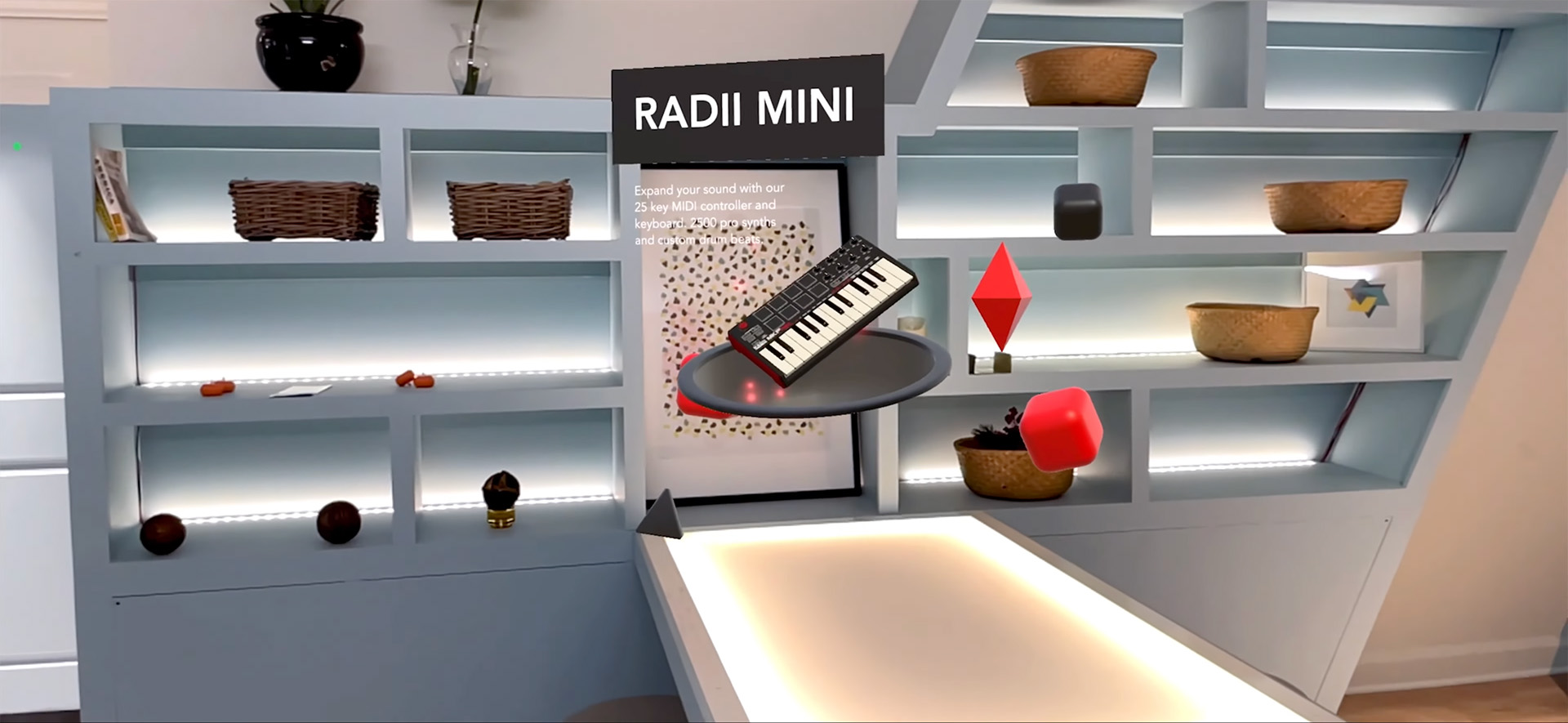
Although these interfaces can now appear all around you, not every element should be a 3D object. Making buttons, text, and notation 3D can overwhelm the attention or needlessly fill the field of view of a user. Instead, Spatial UX should blend a mix of legible 2D UI that ensures usability with purposeful 3D content that can bring authenticity to an experience.
Spatial interfaces bring digital information into the physical world in ways that 2D screens just can't. They can add instructions in context next to real physical products or machines. They allow users to move around, visual content to see it from many angles. They can also respond dynamically to distance, gaze, and orientation to bring an entire space to life. When interfaces understand your environment, they can become contextual and timely.
Spatial experiences support a wide range of use cases. Training modules can appear only when a technician stands in the right location. Configurators can reveal customizations around a product model. Tours and real estate walkthroughs can display sequential information as visitors walk from space to space, and product tutorials can appear at a real scale next to machines or tools.
In the right circumstances, Spatial interfaces can also follow a user. A wrist-anchored menu might appear when needed, a floating prompt may stay at a consistent distance, and over time, AI-driven interfaces may become dynamic, appearing only when relevant and adapting to personal context.
Strong spatial interfaces follow a set of key principles.
Use the environment as part of your interface. Avoid adding UI and digital elements that obscure the physical space.
Text labels and buttons should remain readable. They can be 2D or slightly extruded. Billboarding can also help, but panels should not float around unnaturally.
Show interfaces at the right time and in the right place. Avoid blocking the room or creating clutter.
Interfaces should react to attention, gesture, and proximity. Information can appear when needed, and it can hide when it's not. Important information in menus should be always available and easily discoverable.
Some interfaces make sense to attach to surfaces. Others follow the user or billboard towards them. More could attach to the wrist or appear in front of the user as they look around. Each pattern serves a different function.
Your UI should be mindful of its real surroundings. Elements should maintain contrast, respect geometry, and appear at an appropriate scale.
• A product configurator that displays options around a model and billboards towards the user as they walk around.
• In a training module, different parts of a piece of machinery are highlighted by an AR overlay as the user's gaze passes over them. A description appears to explain more about each part.
• A visitor walks down a hallway in a history museum. As they pass each exhibit, AR graphics appear, and they can hear an orator describe historical events as they come closer to each piece of content.
• Spatial interfaces do not mean a bunch of 3D floating graphics.
• More dimensionality does not equate to better usability.
• Only create interfaces that follow a user if they are urgent or require input immediately.
Spatial interfaces facilitate a new era of interaction design. They blend environment, embodiment, and context to make digital information feel natural. When designed thoughtfully, they become a natural extension of your space, supporting a user and an experience without overwhelming your space.
Learn about augmented reality or start creating your own experiences.